%20{%20.v%20{%20fill:%20%23edeef0;%20}%20.cursor%20{%20fill:%20%23ff4d5e;%20}%20}%20%3c/style%3e%3cpath%20class='v'%20d='M4%2014h10.5L22%2039.5%2029.5%2014H40L28%2050H16Z'/%3e%3cpath%20class='v'%20d='M42%2014h33v9H63v27H54V23H42Z'/%3e%3crect%20class='cursor'%20x='78'%20y='45'%20width='18'%20height='5'/%3e%3c/svg%3e)
Using itTasks
Tasks and Personal Hub
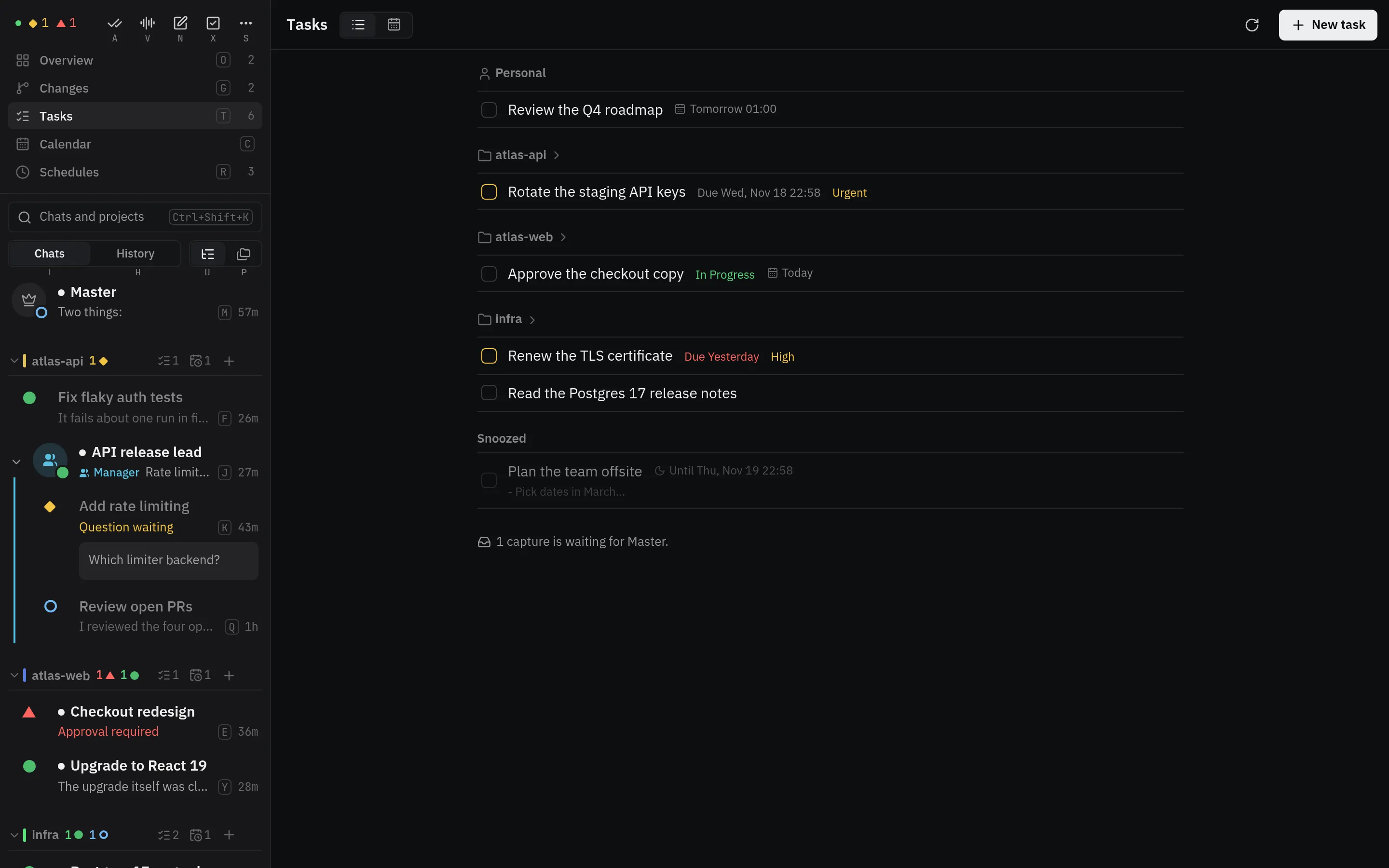
Tasks come from one plugin that serves the tasks service. The chooser,
apps, Telegram and Discord Master messages, and the HUD show them while it runs. Vendetta
ships personal-hub as that plugin; another task source, such as a to-do service, can take
its place by serving the same contract.
Personal Hub
Section titled “Personal Hub”Personal Hub, a separate optional
project, keeps personal tasks in an Obsidian vault. The personal-hub plugin watches the
vault, and the Master receives reminders and clarification requests.
[plugins.personal-hub]
executable = "/absolute/path/to/personal-hub/bin/personal-hub"
vault = "/absolute/path/to/personal-hub/vault"
poll_seconds = 3Requirements:
- Configure
[master]and[master.start]first. - Set the vault’s
Hub.yamltimezone, and enablereminders_enabled. - Start the scheduler, which runs the reminders.
How it works:
- Checkbox captures in
Inbox.md, like “call X tomorrow at noon”, become linked task notes. - Checking a box completes its task.
- Unclear captures go to the Master to clarify.
- Every
poll_secondsthe plugin checks the vault, the hub’s state, the Master, and its schedules, and asks the hub again only when one changed, or a minute has passed. A reminder already scheduled runs at its time; one the clock alone makes due, such as a missed reminder caught up, may wait up to that minute. - Every Master message on Telegram lists your active tasks under To-dos.
- In the chooser,
popens your tasks andCtheir calendar; project headers show how many are open. See Tasks in the chooser. - The HUD’s to-do section keeps them on screen.
- Only the Master can use
vendetta service call personal-hub snapshot,mutate, andresolve: the worker checks that the Master runs the command. - Reminders and captures are the plugin’s schedules. The schedules screen shows them; they can be paused, run now, or deleted, never edited.
- A task’s text never authorizes calls, messages, or doing the task.
Tasks in the chooser
Section titled “Tasks in the chooser”p opens a list of open tasks, personal first and then by project, with
overdue ones on top. C opens the week calendar directly, and Tab
switches between the two. The calendar shows each day’s whole-day tasks above an
hourly timeline, with the current hour marked; narrow terminals show a day strip
and one day. Left/Right move a day, PageUp/PageDown a week, and Home
returns to today. Overdue tasks and passed starts show on today.
Enter lists every action; the common ones have letters: d done (o
reopens it), e edit, s snooze, p priority, u status, c
cancel, n new task. Dates take today, tomorrow, fri, +3d, +2w,
2026-11-02, or 11-02, with an optional 14:30, in the hub’s time zone.
Changes go through the same guarded edit as the app: each names the task’s current version, so an edit made elsewhere conflicts instead of being overwritten, and a failed or uncertain change is never retried. Tasks appear only when the chooser runs on the worker’s tmux server.