%20{%20.v%20{%20fill:%20%23edeef0;%20}%20.cursor%20{%20fill:%20%23ff4d5e;%20}%20}%20%3c/style%3e%3cpath%20class='v'%20d='M4%2014h10.5L22%2039.5%2029.5%2014H40L28%2050H16Z'/%3e%3cpath%20class='v'%20d='M42%2014h33v9H63v27H54V23H42Z'/%3e%3crect%20class='cursor'%20x='78'%20y='45'%20width='18'%20height='5'/%3e%3c/svg%3e)
Running itPeople
People
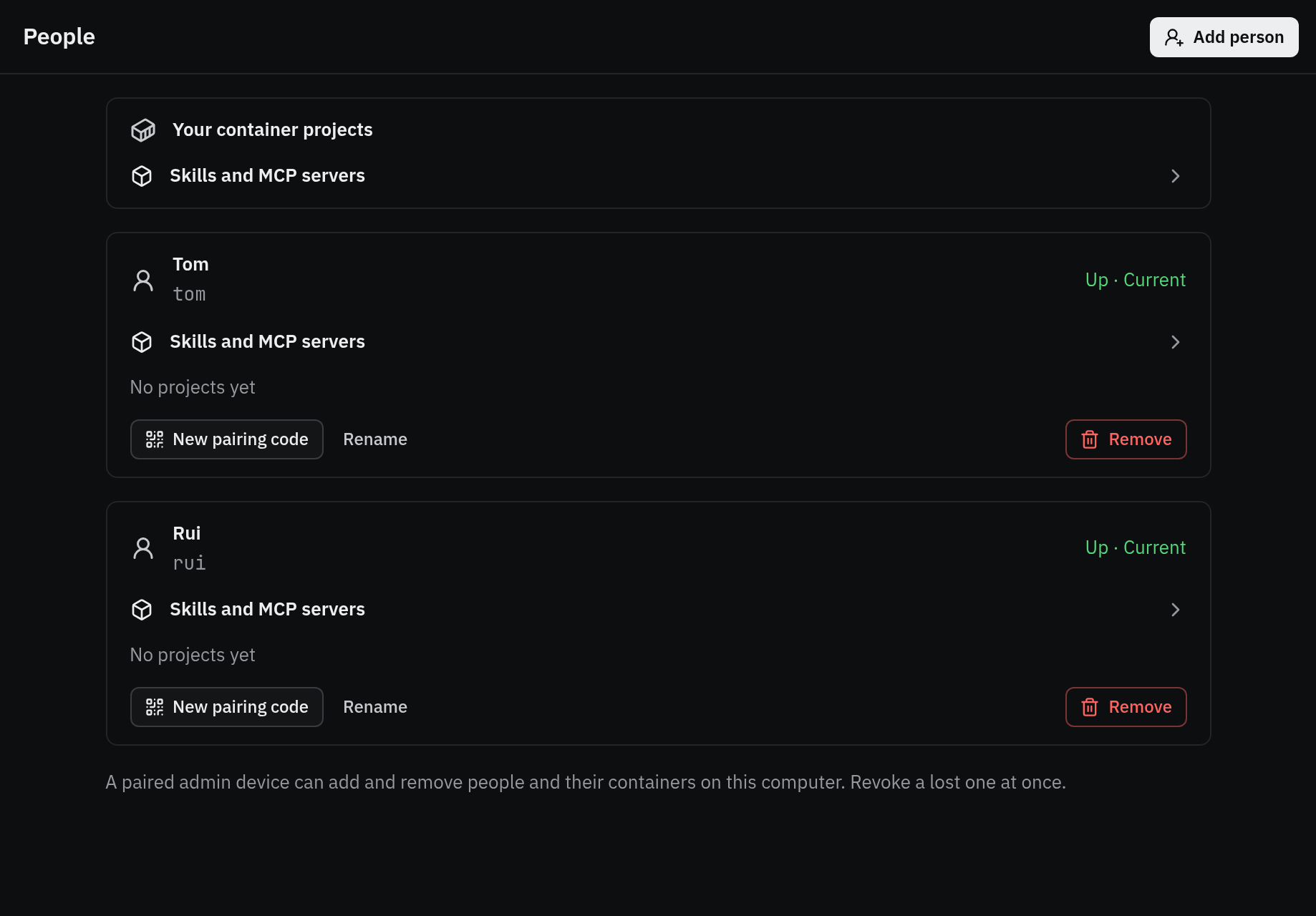
A person is a Vendetta of their own on this computer: their own worker, Master, schedules, app/web endpoint, and paired devices, running under your account. Their agents run only in their container projects, in your rootless Podman, never on the host. By default they have what you have: your Claude, git, and shared services, through you, never a copy of your credentials. They own their Vendetta; it never sees your agents, and yours never see theirs.
vendetta instance add ana          # their folder, workers, tailnet port, Master, pairing code
vendetta instance pair ana         # a new pairing code for their app or browser
vendetta instance list             # each person's port, worker, and address
vendetta instance update           # after you deploy: config written again, workers restarted
vendetta instance update ana --services own # none of your services (--services proxy: yours)
vendetta instance update ana --master off   # no Master for them (--master on: theirs again)
vendetta instance remove ana       # confirm, then their workers, machines, and folder go
vendetta instance rename ana "Ana" # what people see them calledRun them as yourself; nothing needs sudo. --dry-run on add, update, and remove
prints every step and runs nothing. Every step checks before it acts, so rerunning a
command that failed finishes it; list shows an unfinished one as incomplete: STEP.
Once, before the first person
Section titled “Once, before the first person”- Rootless Podman. People’s machines always run in it, on an image
instance addgets for them (people/image.json) andinstance updategets again after an install, asmachine image builddoes, whatever runtime your own machines use. Without a Master ([people] master = false), the image is got by the firstupdateafter they have a machine. loginctl enable-linger, so your user manager, and their Vendetta with it, keeps running when you log out.- For their addresses on your tailnet, the Tailscale plugin, with
sudo tailscale set --operator=$USERonce, so it runstailscale serveas you. Without it, serve each person’s port yourself;addsays which.
What add makes
Section titled “What add makes”~/.local/state/vendetta/people/ana/(0700): their state, their config, their projects (home/projects), and the Claude proxy folders of their machines.- Their workers:
vendetta-person-schedule@anaandvendetta-person-notify@ana, your user units, which runvendetta person ana …in their folder. A person runs your installed Vendetta. - A config you own (
people/ana/config/vendetta/config.toml): the next free app port from 8744 and apublic_urlon your tailnet host (this machine’s, as the Tailscale plugin reports it, else your own app address’s, or--tailnet-host), their machines’ names (vendetta.ana.PROJECT), limits, image, and your[machines] instructions.updatewrites these tables again; any other table you add (their[plugins.ntfy], say) stays. - Their Master: an agent in their
mastercontainer project, alone there. Their apps show it as the Master’s row only, never as a project, and it is not shared. - A pairing code, and with the Tailscale plugin their tailnet port and their own name
(
vendetta-HOST-ana.TAILNET) beside it, which becomes their address once a tailnet admin defines its Service and approves this machine as its host;listshows what it waits for.
Their machines’ limits are yours to set:
[people]
memory = "2g"   # each machine
cpus = 2.0      # each machine
pids = 1024     # each machine
machines = 5    # per person
master = true # make each person's MasterA consumer Claude subscription is for one person: serving another person’s Claude from
yours is account sharing under Anthropic’s terms. It is your call; --claude-login own
gives them their own account instead.
Their phone needs tailnet access to this machine: invite them or share the machine. Messaging bots for them are not set up; add their own to their config.
Your own agents run as you, so they can read people’s folders. Their agents run in containers, which see only their own clone and their own sockets.
What they take from you
Section titled “What they take from you”A person has what you have configured, through you: each capability below is on unless you turn it off for them, and your credentials never leave your account.
| Capability | Flag on add and update |
Through |
|---|---|---|
| Claude | --claude-login proxy|own |
your Claude proxy, for their machines |
| Git | --git proxy|own |
your git login for your git hosts, for their machines |
| Services | --services proxy|own |
every service your plugins share with people, such as transcription and narration, through your worker |
| Master | --master on|off |
their own Master, an agent in their master container project |
proxy is the default. With --claude-login own, they log in inside each machine
(vendetta machine login NAME, or its terminal in the app). update writes a change to
their folder and restarts their workers. list shows each person’s (“yours: claude, git,
services; their own: nothing”). The apps’ People screen has a switch per capability for each
person, which runs the same update.
Without a Master (--master off), they have no Master row, no To Master, and their
Telegram or Discord General chat and Master schedules say there is none; they still start
agents in their projects. An existing Master’s machine is stopped and kept for it
([master] kept in their config): it is yours to manage, it does not count against their
machines, their apps do not list it, nothing starts in it, and the old Master’s chat shows
only in their history. --master on starts a new Master there, as add does.
[people] master = false gives no one a Master, whatever each person’s switch says.
Skills and MCP servers you pick
Section titled “Skills and MCP servers you pick”Nothing of your skills and MCP servers is shared until you pick it, one by one, for a person, for everyone (people added later too), or for your own container projects:
vendetta instance shared [ana]                    # your skills and servers; ana's picks
vendetta instance pick ana --skill writing-plans  # --mcp NAME for a server; --off to stop
vendetta instance pick --everyone --skill humanizer
vendetta instance pick --machines --mcp gateway   # your own container projects
vendetta instance pick ana --mcp gateway --reload # then reload her sessions, each once idle
vendetta instance reload anaA shared MCP server runs on your side, as you: they can use it as you can. Their machines’ Claude loads what you pick from a plugin your proxy keeps in each machine’s folder. Their own skills and servers, in each of their machines, stay theirs, and one of the same name wins over yours there. See plugins.
Their own accounts
Section titled “Their own accounts”They connect GitHub (and providers like it) themselves, in their Settings → Connections,
with your [plugins.github] client_id, which add and update write into their config
while your GitHub plugin runs. Its token stays in their folder
and reaches only their machines; you see only whether it is connected and as whom (People,
instance list: “connected: GitHub: octocat”).
With [plugins.claude-proxy.git] on your side (plugins), their
machines’ git clones, fetches, and pushes your git hosts’ repos with your login, which
never leaves your proxy. They can read every repo your login can and, unless a host has
push = false, push to it. With --git own, their machines get no git.sock.
Removing someone
Section titled “Removing someone”remove lists what goes and asks you to type the name (--confirm NAME without a
terminal): their tailnet port, each machine’s container and volumes, their workers, and
their folder with their conversations, chats, paired devices, and clones.
--keep-state keeps the folder as people/.removed/NAME-DATE, with each machine’s
volumes exported beside it (NAME-DATE.volumes/*.tar).
Only people add made are touched; the record is instances.json in your state
directory.
From the apps
Section titled “From the apps”Your app and web devices can do all of this too (People, in Settings): add a person with
their display name, show a new pairing code (made by their own Vendetta), update one or
all, rename, and remove. Your worker runs the same commands and the app shows each step; a
failed one shows its output and Retry runs it again from its checks. remove shows its
plan first, and goes only while nothing in it changed.
A paired device of yours can add and remove people and their containers. Revoke a lost
device at once: vendetta app devices, then vendetta app revoke ID.
People see each other’s names only. You also see each person’s project names and machine states, and can start, stop, fetch, recreate, and remove their container projects, and make new ones in their folder: their Vendetta does it. You never see their chats unless they share one.