%20{%20.v%20{%20fill:%20%23edeef0;%20}%20.cursor%20{%20fill:%20%23ff4d5e;%20}%20}%20%3c/style%3e%3cpath%20class='v'%20d='M4%2014h10.5L22%2039.5%2029.5%2014H40L28%2050H16Z'/%3e%3cpath%20class='v'%20d='M42%2014h33v9H63v27H54V23H42Z'/%3e%3crect%20class='cursor'%20x='78'%20y='45'%20width='18'%20height='5'/%3e%3c/svg%3e)
Using itHUD and tab labels
Floating panels and tab labels

These are plugins of the notification worker (vendetta notify start). They follow
the tmux server in [plugins.host-tmux] socket, or tmux’s default server.
Kitty HUD (Hyprland)
Section titled “Kitty HUD (Hyprland)”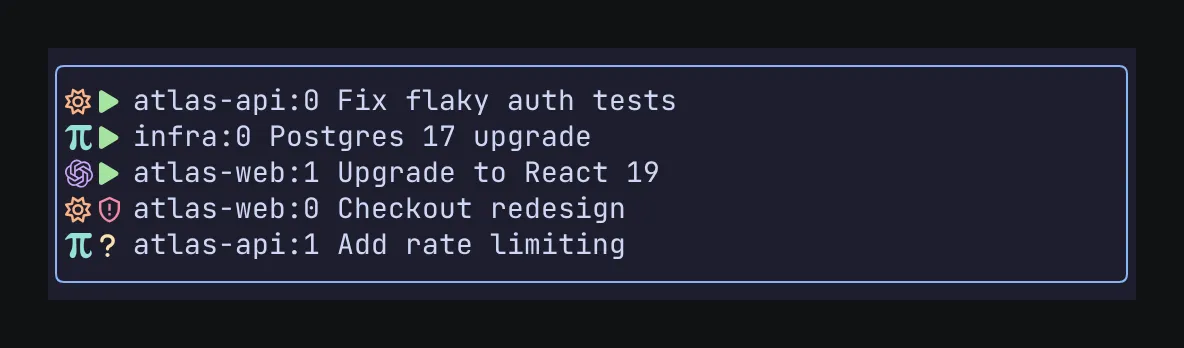
A small non-focusable panel in the top-right corner of your active terminal lists running agents first, then recent ones, with team tags. It hides while the chooser is open, when you switch apps, or when the terminal is too small. Your tmux layout and status bar are untouched.
[plugins.hud-kitty]
enabled = true
max_agents = 5   # 1–20
width_px = 640   # 160–1600
margin_px = 12
min_width = 100  # hide below this terminal size
min_height = 24
# font_family / font_size default to Kitty's own settingsvendetta-hud-kitty start # also: stop, toggleIt stays on until you stop it. The plugin also offers hud-kitty:toggle, start, and
stop for desktop keys:
[plugins.shortcuts.keys]
"hud-kitty:toggle" = "super+h"To start it automatically from tmux, add these hooks. Slot 100 keeps other hooks intact.
set-hook -g session-created[100] { run-shell -b '"$HOME/.local/bin/vendetta-hud-kitty" start' }
set-hook -g client-attached[100] { run-shell -b '"$HOME/.local/bin/vendetta-hud-kitty" start' }It works only on a local Hyprland desktop: it places itself over the focused window
when a terminal of Vendetta’s hosts (tmux or Kitty) shows in it, and shows nothing over
other windows or on other desktops. It needs kitten panel.
Enabling the plugin is not enough: run vendetta-hud-kitty start (or the hooks above)
to show the panel. If you run several desktops, set HYPRLAND_INSTANCE_SIGNATURE to pick
one. Settings reload while it runs.
Desktop HUD
Section titled “Desktop HUD”The desktop HUD runs on Hyprland and, through the Vendetta app, on macOS. Other Linux
desktops are not supported. On Hyprland its colors come from Noctalia’s theme
(~/.config/noctalia) when there is one.
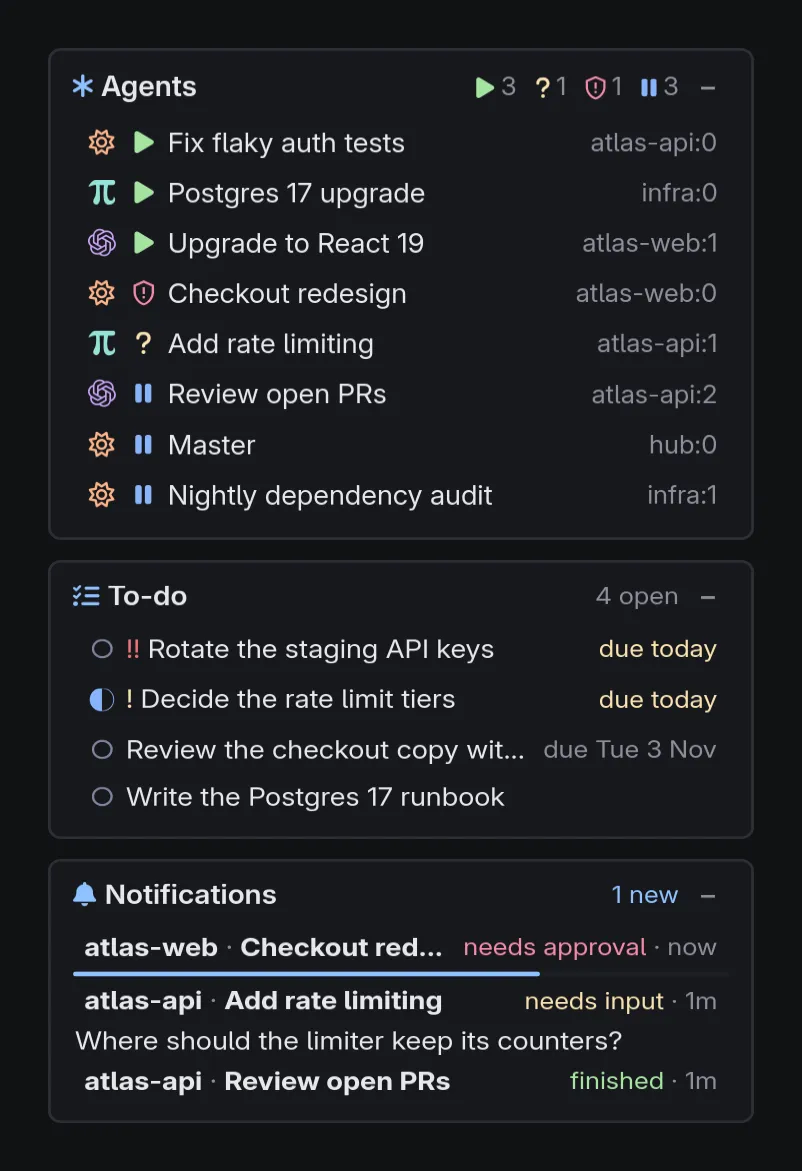
Cards stack in one column in the top-right corner of the focused monitor, above
normal windows (layer = "overlay" also covers fullscreen ones), in Noctalia’s
colors. Each card is a section: agents, running
first, with team tags, your Personal Hub to-dos, overdue first, the worker’s
notifications, and anything a program of yours prints. A notification names the
project and the agent in bold, says what happened, and shows what the agent said or
asks, its Markdown formatted, up to a few lines; click it to open that agent. It shows in its card for a few
seconds, over a bar that runs out with it, so several at once stay readable as each
times out; hover the card, or keep it open with +, to scroll back through the
newest ones. While you dictate, the recording shows in a
card above them all, or where sections places it, and a failed one says it was kept
to send again; a card that appears pushes the
ones below it down. The HUD never
takes the keyboard, and clicks outside the cards reach the windows beneath. Click
an agent to open it: in the focused terminal, else in the one used last, which comes
forward; an agent outside tmux and Kitty brings its own terminal forward. Bringing a
window forward needs the shortcuts plugin.
− minimizes a card to its header. With collapse = "hover", cards show only
their headers, a card shows its rows while the pointer is over it, and + keeps
it open. Drag any header to move the whole column; it stays there across restarts,
and a double click on a header returns it to the corner.
On macOS, the Vendetta app draws the cards
from the same settings: vendetta-hud serves them on a private socket, and the
app’s dictation is the first card while it records, unless sections places it. An
agent click opens it in the terminal used most recently, which the app brings forward
for the shortcuts plugin.
[plugins.hud]
# platform = "auto"  # "hyprland" or "macos" when auto picks wrong
# width_px = 380     # 200–1200
# font_size = 15     # rows' text, 6–36; titles and notes follow it
# opacity = 0.75     # the cards' background, 0–1; text stays solid
# monitor = "DP-2"   # default: the focused monitor
# layer = "top"      # "overlay" also covers fullscreen windows
# collapse = "manual" # "hover": headers only, rows while hovered; + keeps a card open

# Sections, top to bottom; the default is agents, then notifications. A running
# dictation's card goes first unless a { type = "dictation" } entry places it.
[[plugins.hud.sections]]
type = "agents"
# max = 8            # rows, 1–50

[[plugins.hud.sections]]
type = "todo"        # needs a plugin serving tasks, such as personal-hub
# max = 10

[[plugins.hud.sections]]
type = "notifications" # the worker's alerts; with agents, the default
# seconds = 10       # how long each shows while the card is folded, 1–3600
# max = 50           # how many the history keeps, 1–100
# visible = 8        # history rows before the rest scroll, 1–50
# lines = 6          # lines of what each agent said, 1–50
# font_size = 17     # its own text size, 6–36; the HUD's by default

[[plugins.hud.sections]]
type = "command"     # your own; see docs/hud-sections.md
name = "disk"
command = ["/home/you/bin/disk-hud"]
interval_seconds = 60A command section’s program prints its section as JSON lines: a title, a summary,
and rows with icons, colors, and a command to run on click. See
hud-sections.md. The HUD takes up to 20 sections, with unique names,
and interval_seconds defaults to 30.
./install.sh builds it when GTK 4 and gtk4-layer-shell are installed; restart
the worker after enabling it. The to-do section lists unfinished tasks that are not
snoozed and refreshes when the hub changes. To minimize from a key:
hl.bind("SUPER + A", hl.dsp.exec_cmd("vendetta-hud toggle"))              -- every section
hl.bind("SUPER + SHIFT + A", hl.dsp.exec_cmd("vendetta-hud toggle todo"))minimize and restore take a section too, and reset returns a dragged column
to the corner.
Agent titles in tmux tabs
Section titled “Agent titles in tmux tabs”With tab_labels in the tmux host’s table, and the worker
restarted, the tmux host publishes @vendetta-tab-label on each window that holds an
agent. The label has provider and status icons plus the title; several agents in one tab
appear in pane order, and a window of managed agents reads Agents. It works over SSH
and leaves window names untouched.
[plugins.host-tmux]
tab_labels = true
tab_label_width = 42 # title width in columns, 8–200Show the label in your window format:
set -g window-status-format '#I #{?@vendetta-tab-label,#{@vendetta-tab-label},#W}'
set -g window-status-current-format '#I #{?@vendetta-tab-label,#{@vendetta-tab-label},#W}'integrations/tmux-tabs.conf has this setup. For Catppuccin, set its window text before loading the theme instead:
set -g @catppuccin_window_text ' #{?@vendetta-tab-label,#{@vendetta-tab-label},#{=/42/...:#{window_name} #{b:pane_current_path}}}'
set -g @catppuccin_window_current_text ' #{?@vendetta-tab-label,#{@vendetta-tab-label},#{=/42/...:#{window_name} #{b:pane_current_path}}}'Stopping the worker, or tab_labels = false and a worker restart, clears the labels.