%20{%20.v%20{%20fill:%20%23edeef0;%20}%20.cursor%20{%20fill:%20%23ff4d5e;%20}%20}%20%3c/style%3e%3cpath%20class='v'%20d='M4%2014h10.5L22%2039.5%2029.5%2014H40L28%2050H16Z'/%3e%3cpath%20class='v'%20d='M42%2014h33v9H63v27H54V23H42Z'/%3e%3crect%20class='cursor'%20x='78'%20y='45'%20width='18'%20height='5'/%3e%3c/svg%3e)
Using itSchedules
Scheduling
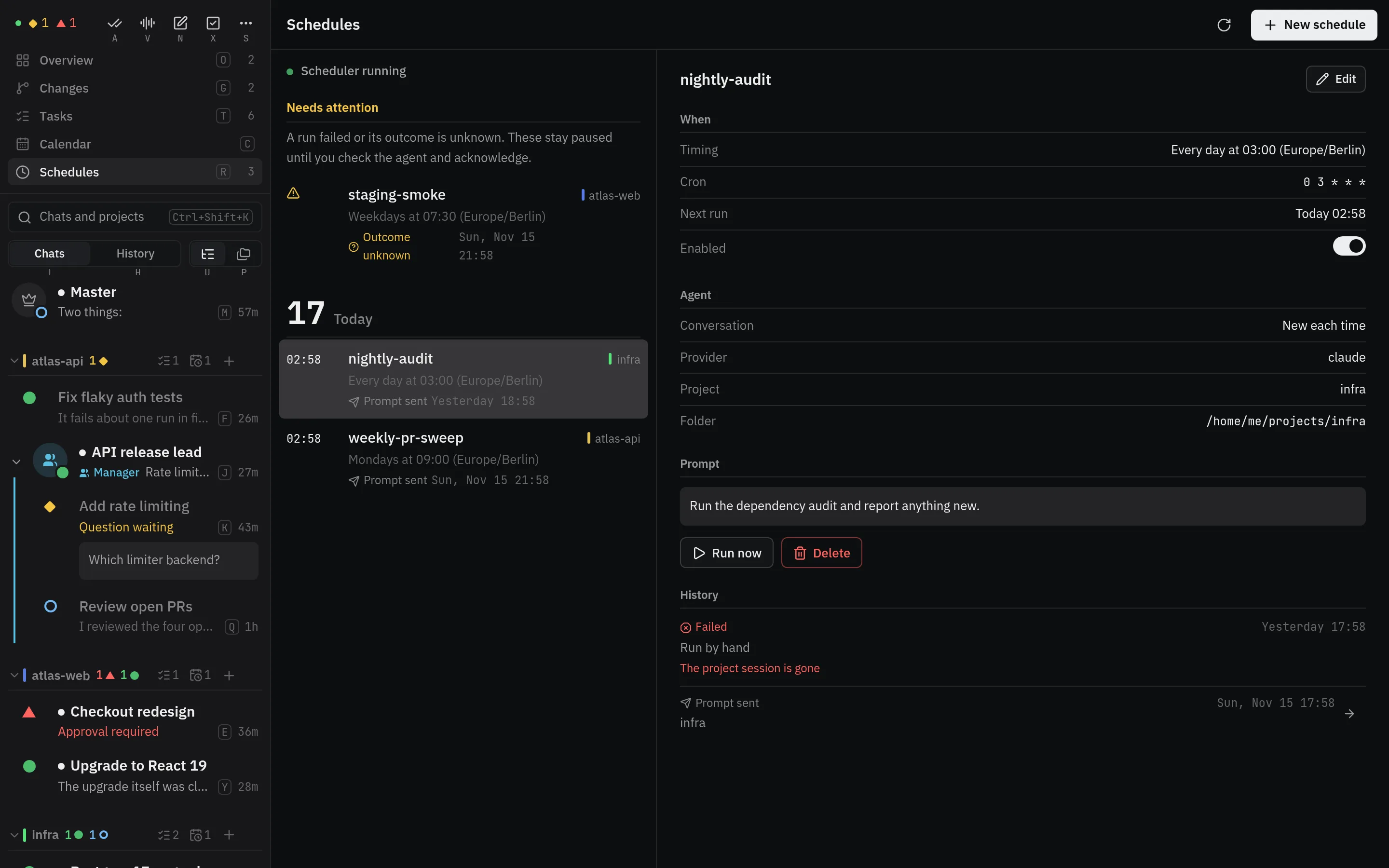
Vendetta can send a prompt on a cron schedule, once at a set time, or on demand, when
you run it or a webhook does, without crontab or systemd timers. Each occurrence starts a new agent, goes to the
same agent each time, or targets an existing conversation. A project’s
vendetta.toml can declare schedules too; those follow the file.
# Weekdays 09:30 Berlin time, new Claude agent each time.
vendetta schedule add --id review --cron '30 9 * * 1-5' \
  --timezone Europe/Berlin --new --provider claude \
  --cwd /abs/project --tmux-session project \
  --prompt 'Review this project without changing files.'

# One agent for every run: started by the first, prompted again by each later one.
vendetta schedule add --id standup --cron '0 9 * * 1-5' \
  --timezone Europe/Berlin --reuse --provider claude \
  --cwd /abs/project --tmux-session project \
  --prompt 'Summarize what changed since your last summary.'

# Resume this exact conversation (`vendetta snapshot` lists those in tmux) every day at 09:00 UTC.
vendetta schedule add --id daily --cron '0 9 * * *' \
  --provider omp --session-id CONVERSATION-ID \
  --cwd /abs/project --tmux-session project --prompt 'Report the next useful step.'

# Once.
vendetta schedule add --id nudge --at '2027-01-15T09:00:00+02:00' \
  --provider omp --session-id CONVERSATION-ID \
  --cwd /abs/project --tmux-session project --prompt 'Remind me to review my todos.'

vendetta schedule start    # detached worker
vendetta schedule status
vendetta schedule list
vendetta schedule history --id review
vendetta schedule run-now --id review   # a real run, not a dry run
vendetta schedule disable --id review   # also: enable, remove
# `schedule update` takes the same options as `add`.Timing
- Cron has five numeric fields (minute, hour, day, month, weekday) with lists, ranges, and steps. Sunday is 0 or 7. When both day fields are restricted, either one matching is enough.
--timezonetakes an IANA zone; without it, schedules use UTC. A new schedule in the chooser starts in this machine’s zone. A zoned schedule follows local clock time through daylight saving:- a local time that repeats when clocks go back runs once;
- a time skipped when clocks go forward runs right after the jump.
--attakes an RFC 3339 time with whole seconds and an explicit offset. A one-time job missed while the worker was down runs once when it returns. Missed cron minutes are not caught up.--on-demandgives a schedule no time of its own: it runs withrun-now, or when a webhook calls it.
Targets
- An existing conversation receives the prompt in place if it is running. Otherwise its exact conversation is resumed (omp, Codex, and Claude Code).
--newstarts a fresh agent (Codex, omp, Claude Code, or OpenCode) in the Agents tab of--tmux-session.--reuse(omp, Codex, or Claude Code) starts a new agent the first time and remembers its conversation, whichschedule listshows asconversation. Later runs prompt it in place while it runs, resume it once it exited, and start (and remember) a new one only after it was deleted from the history, or its provider no longer has it; that run’s receipt names the one itreplaced. Changing the provider or folder, or choosing--newor--session-id, forgets it.- Switching a schedule to
--reuse(in the editor too) takes the newest agent its own earlier runs started, while that conversation is still there and ran in the schedule’s folder, instead of starting another.--reuse-from KEYreuses the conversation of that key instead (vendetta agent listandhistoryshow keys), from the same provider and folder; its provider is the schedule’s when you give none. Both answer with theconversationthey took. - A resume that can’t be verified, or a startup that hits a dialog or question, fails visibly. It never falls back to a new agent.
Failures never repeat. Each occurrence is recorded before dispatch. A failed
or uncertain run disables that schedule until you check schedule history and the
agent, then run:
vendetta schedule enable --id ID --acknowledge-uncertainHistory keeps the latest 1,000 runs. A successful run means the prompt was submitted, not that the task is done.
Worker:
install.shruns it at login: through integrations/vendetta-schedule.service on Linux with a systemd user manager, and through launchd on macOS. Those restart it, so stop it withsystemctl --userorlaunchctl;schedule stopand the screen’s w only last a few seconds.- Without a service,
schedule startruns it as its own systemd transient unit, or a detached process, so closing the pane that started it doesn’t stop it. schedule tickprocesses the current minute once;schedule runruns in the foreground.
In the chooser:
sstarts a new schedule for the selection; Esc from the editor shows every schedule.- Schedules appear as
cronoroncerows under their project; Enter orson one opens the schedules screen with it selected. It groups schedules by needs-your-check, active, paused, and finished, and shows timing in words, the next run, recent runs, and the prompt. Enter lists the actions that apply; their letters work directly: e edit, r run now, p pause or enable, a acknowledge a run that needs your check, d delete, n new, w start or stop the worker. Personal hub reminders only accept acknowledgement. - Completed one-time schedules, and paused ones past their time, fold under a
Past schedules row; Enter or Right expands it, Enter or Left
folds it again (Left works from any schedule inside), and search opens it.
The scheduler keeps the newest
[schedules] keep_finishedcompleted ones (default 20) and removes older ones; their history stays. - The editor’s When field takes
0 9 * * * Europe/Berlin,at 2027-01-15T09:00:00+02:00, oron demand, and shows how it reads and when it next runs. Left/Right change the provider and whether each run starts a new agent, goes to the same agent each time, or resumes one exact conversation.